

Introduction
In my first article on Oracle APEX 26.1 AI Agents, I used a simple example to introduce Agents and AI Tools.
For this second article, I wanted to build something closer to a real business application which “goes beyond” answering questions to actually “taking action” as well.
This is in line with agentic applications working with the user in a format that is as frictionless as possible. So, rather than the user having to understand how to drive screens to find what they want, they are given access to an AI assistant with whom they can interact using natural language which will answer questions and help to perform tasks. We can build in guardrails and checks and we will show that in action too.
This example shows an AP Invoice Hold Review Workbench that helps users to :
- Find important held invoices
- Understand why they need attention
- Create and assign review cases
- Add investigation notes
- Manage case status
- Retain an audit history
The Agent does not replace the application. We still let the user access screens to seek and edit and update and even export data. The Agent is there as another interface to their processing as it interprets the users’ request and APEX and Oracle database control the processing.
What the application does
The application contains five pages:
- Dashboard
- Invoice Holds
- Invoice Hold Detail
- Review Cases
- Review Case Detail
The application allows users to complete the entire process through normal APEX pages and the AI Assistant provides a more “natural” way to find information and request the same controlled actions.
For this article I used demonstration data rather than connecting directly to Oracle Fusion as this lets us establish the workflow before introducing Fusion REST and Cosmos in the next article. We don’t dig into the code for all the agents as the part I want to show is that we can have an agent with a portfolio of tools made available to it, and by using prompting and other techniques we allow the agent to determine which tools to use for specific user requests. We also also splitting the tools into different types, tools that the agent can call to return data to reply to user queries, and tools the agent can use to perform tasks, which I am calling a workflow. We also introduce some checks ( which I use as a synonym for “guardrails” so that before any tool performs an action, it is verified with the user to get the go-ahead to take that suggested action.
Traditional Screens
I generated sample application screens so that the invoice management could all be achieved via screens, and we use the same tables, views and package as the AI processing to interrogate the data and add details and create cases and change statuses.
We won’t look at the screens as we want to look at the AI Agent side, but I show some of them here so you get an idea of what they look like.


AI Workflow Alternative
So, as well as screens, we have implemented an AI agent with some tools, so what we will do is to show the “agent in action” and then look at how we put that together.
The Agent In Action
We’ll start by invoking the read-only tools first, then the three action tools (which will pop a confirmation dialog since REQUIRES_CONFIRMATION = Yes).
1. find_invoice_holds (read)
“Which invoice holds should I prioritise today?”

2. find_invoice_holds with filter (read)
“Show me only the holds for Beyond Staffing Services.”

3. get_invoice_hold (read)
“Give me the full details of hold 3.”

4.find_review_cases (read)
“Is there already a review case open for invoice MSS-0726-18?”
Expect case 1 to come back: status ASSIGNED, owner AP_MANAGER.

5.find_review_cases (read)
“Is there already a review case open for invoice MSS-0726-27?”
There isn’t so I would expect it to say there isn’t, and then we can create one.

6. create_review_case (action confirm required)
“Create a review case for MSS-0726-27. Title it ‘Investigate quantity variance on MSS-07626-27’ and assign it to AP_MANAGER.”
It has no existing case, so this should succeed after you approve the confirmation prompt, landing in ASSIGNED status.


7. change_case_status (action confirm required)
“Move case 1 to IN_REVIEW.”
Progresses the priority case (hold 3) from ASSIGNED → IN_REVIEW.


8. add_case_note (action confirm required)
“Add a note to case 1: ‘Contacted the supplier, receipt requested, awaiting response.'”


9. Guardrail Check Release The Hold.
The AI Agent can’t release holds as we told it in the package it can not, so we should get that as feedback.

How Did We Create This?
The Data Model
The whole application data model is quite simple, I created and populated some sample tables to hold suppliers, invoices and holds as well as notes and history.
DVM_AP_SUPPLIERS
DVM_AP_INVOICES
DVM_AP_INVOICE_HOLDS
DVM_AP_REVIEW_CASES
DVM_AP_CASE_NOTES
DVM_AP_CASE_HISTORY
The relationship is straightforward
Supplier
   |
Invoice
   |
Invoice Hold
   |
Review Case
   |
Notes and History
I also created a few views and a database package called DVM_AP_HOLD_API which performs all the DML where we expose a number of the procedures that are then used by the AI agents we will create, and also by the screens as well.
Both the normal APEX pages and the AI Tools call the same package.
Creating the AI Agent

I created an Agent called:
AP Invoice Hold Review AssistantIts system prompt includes several explicit boundaries:
- Use AI Tools for every invoice, hold and case fact;
- Never invent identifiers, amounts, dates, owners or statuses;
- Check for an existing active case before creating another;
- Describe the data as demonstration data, not live Fusion data;
- Require confirmation for write actions;
- Follow the status rules enforced by the application;
- Never claim to release an invoice hold or update Oracle Fusion.

The Agent has six On Demand AI Tools. 3 are Read Tools with a type of Retrieve Data and 3 are “Action” tools which execute server side code.

Taking The Temperature
There is a temperature setting, which I have set to .2

The inline documentation in APEX is pretty good. Clicking the ? next to all the items that display it bring up a pop up explanation. We are erring on the side of “deterministic”. As with all things AI I find it best to experiment with settings as depending on your usage/requirements then a “hotter” setting may yield more desirable results.

The AI Tools
For this application the Tools have separate responsibilities and we lay these out in the table below.
| Tool | Purpose |
|---|---|
find_invoice_holds | Find or list held invoices |
get_invoice_hold | Retrieve one known hold |
find_review_cases | Find existing review cases |
create_review_case | Create a case for a known active hold |
add_case_note | Add information to an existing case |
change_case_status | Move an existing case through its permitted lifecycle |
Read tools
The first three Tools are read-only. Their job is to help the Agent locate and understand information already held in the application.
Keeping these purposes separate makes Tool selection more “reliable”. The Agent can distinguish between finding a set of records, inspecting one known hold and searching the review workload. None of these Tools changes data, they simply return controlled application information that the Agent can explain or use in a later step.
Read Tool 1 – Find_Invoice_Holds
We have created this tool to allow the agent to find and prioritise invoice holds. For each tool we provide descriptions, parameters and SQL to perform the operation, so it is deterministic. It is the Agent orchestrating the calls of the agents and passing the variables, but we control the code without those boundaries.

select hold_id,
       invoice_number,
       supplier_name,
       business_unit,
       invoice_amount,
       currency_code,
       hold_name,
       hold_reason,
       days_on_hold,
       payment_timing,
       supplier_risk_rating,
       risk_score,
       suggested_priority,
       open_case_count
  from dvm_ap_hold_findings_v
 where hold_status = 'ACTIVE'
   and (:P_SUPPLIER_NAME is null
        or upper(supplier_name) like '%' || upper(:P_SUPPLIER_NAME) || '%')
   and (:P_PRIORITY is null
        or suggested_priority = upper(:P_PRIORITY))
   and (:P_MIN_DAYS_ON_HOLD is null
        or days_on_hold >= :P_MIN_DAYS_ON_HOLD)
 order by risk_score desc,
          invoice_amount desc
Read tool 2 – Find Review Cases
We have a tool which calls a SQL statement to find review cases, so the agent can report these. I show the definition here and not the detailed SQL behind it unlike the first two as we’re just showing the “point” of being to create as many tools as you would need to allow the agent to do the jobs you want it to do.

READ TOOL 3 – GET INVOICE HOLD
This tool is designed to retrieve a lot of detailed data about a specific hold. It is about as simple as it gets as it literally accepts a Hold ID and passes that in and makes available all the detail about that specific hold.

The code it then literally a straight query from a view we have created just using the Hold ID passed in
select hold_id,
       invoice_number,
       supplier_number,
       supplier_name,
       supplier_risk_rating,
       business_unit,
       invoice_date,
       invoice_amount,
       currency_code,
       due_date,
       hold_name,
       hold_reason,
       hold_date,
       days_on_hold,
       hold_status,
       payment_timing,
       risk_score,
       suggested_priority,
       open_case_count
  from dvm_ap_hold_findings_v
 where hold_id = :P_HOLD_ID
Action Tools
The remaining three Tools perform “doing” business actions.
These tools calls the application package, which validates the parameters, applies the business rules and records the outcome in the case history. They also require confirmation before execution, so the user can see the proposed action before anything is changed.
This creates a clear separation between the tool types whereby the “find” tools help the Agent understand the current situation and the “doing” tools allow it to request a change/process.
ACTION TOOL 1 – CREATE REVIEW CASE

This tool calls a package to “do the do”, so again the control is via the AI Agent but we have deterministic control over the update that is actually done and we call a package so that we can ensure that what is done is the same via the application screens as it is via the agent.
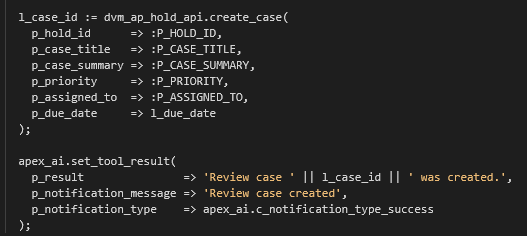
Within this setup we can also add in the facility to prompt for confirmation before continuing. Here I have it at the most basic level that at least asks me if I want the agent to “Create a review case for this invoice hold?”

action tool 2 – CHANGE CASE STATUS

This tool changes the status of a review case, so it needs to know the case it is going to change and the review status it is going to change it to and then it can execute the PL/SQL server side code.

Like the previous tool, this also has the confirm set, so the user must confirm the change before it occurs.
action tool 3 – add case note

This tool adds a new case note to a hold by calling a PL/SQL process that does the transaction.

The Agent can therefore find and explain work, then help manage it through controlled application operations.
How the Agent decides which Tool to use
The Agent does not inspect the SQL or PL/SQL behind an AI Tool.
When the Agent runs the AI service is given the Tool metadata that was configured in APEX, including:
- The Tool name
- The Tool description
- Parameter names
- Parameter descriptions
- Allowed parameter values
The LLM compares the user’s request with that metadata and decides which Tool is the best match.
For example, the find_invoice_holds Tool is described as:
“Search active invoice holds using an optional supplier name, suggested priority and minimum number of days on hold. Use this when the user is trying to find or list held invoices and does not yet have a hold identifier.”
When the user asks:
“Show me the invoices on hold for Beyond Technology Partners.”
that description points the Agent towards find_invoice_holds.
The Agent supplies:
Supplier name: Beyond Technology PartnersAPEX executes the predefined Tool implementation and returns the relevant rows.
If the user then asks:
“Give me the full details for that hold”.
the Agent should choose get_invoice_hold, because that Tool is described as retrieving a known hold using its identifier.
The Tool descriptions need to be more precise than typical developer comments.
A vague description like “gets invoice information” doesn’t really give the model enough help to direct it properly and so a “proper” description really needs to lay out things like this following :
- What the Tool does
- When it should be used
- What information it needs
- What it returns
- When another Tool should be used instead
The system prompt also helps guide the sequence. e.g. , it tells the Agent to identify the hold and check for an existing case before requesting the creation of a new one.
A request such as:
“Find the Beyond Technology Partners invoice and create a high-priority case for it.”
may result in more than one Tool call such as this sequence below
find_invoice_holds
        ↓
get_invoice_hold
        ↓
create_review_case
The result from one Tool supplies the identifier needed by the next and this is one of the most important things to understand.
The Tool name, description and parameters form the “menu” from which the Agent chooses which tools to use. If two Tools have vague or overlapping descriptions then Tool selection becomes somewhat less reliable.
The database still provides the final control as each tool pipes it’s request via a database package we have created. So even if the Agent chooses the wrong action Tool or calls it too early, the application package can reject an invalid hold, duplicate case, missing owner or prohibited status transition as we have coded the guardrails in.
Wrap Up
The agentic framework in Oracle APEX 26.1 provides us the ability to have an interactive experience for users, whereby they can interact using natural language to perform various tasks. This allows us to design interactions so the user does not need to know how to “drive” screens but can both interrogate and perform action functions on the data through controlled deterministic APIs, which we can further control via confirmations.