

In this article I am going to use an Oracle 26ai database, an MCP server, an agent and a LLM to ask a bunch of questions of my data and even create a chart in python – all without me having to write any code. This is not a fully detailed process for installation as that is covered in many other places, including superb information from Jeff Smith/Kris Rice on MCP (Model Context Protocol). MCP is a game changer as it provides a standardisation for agents to have LLMs to directly communicate with datasources and add context. The blog linked to above has some really useful information on the caveats about LLM’s and security which i’d recommend reading.
The Oracle MCP guide details the abstracted commands available and neatly summarises that “Ultimately, the SQLcl MCP Server eliminates the need for direct manual input and allows AI applications to independently perform complex database operations that would’ve required significant technical expertise and effort.”
The MCP guide discusses using some different clients and setups ( e.g. Claud, Cline, etc). In this example i’m accessing the MCP Server in SQLcl via the SQL Developer extension in VS Code (as SQLcl is included with the extension) with the github copilot agent.
Let’s start by installing VS Code and the latest SQL Developer extension. If you’ve not already got VS Code then you can start by downloading that from here and then read about the SQL Extension here and follow the instructions to install the SQL Developer extension ( which is a pretty simple process ) and gives us access to the command line based SQL prompt and MCP Server, Oracle SQLcl
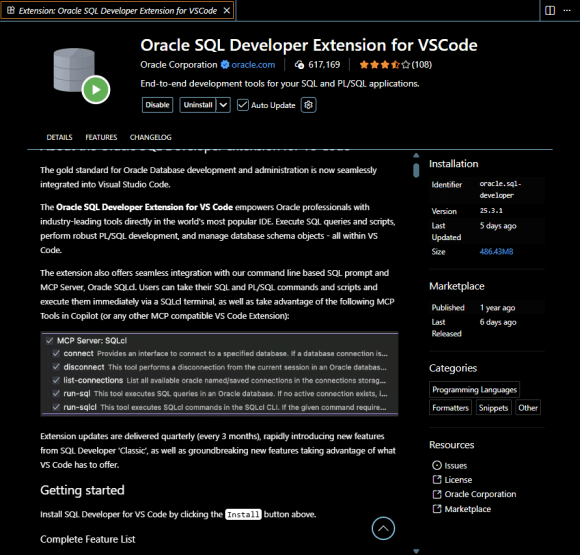
I can connect to my “23ai” cloud autonomous database – which has just been upgraded to 26ai – and reminds me not to put the version name in the connection name! If you’ve not connected to a database using the SQL Developer extension in VS Code then it’s really the same as connecting any SQL Developer connection, so there’s nothing new to learn there.

I can then select the SQLcl Developer MCP Server and start it.

Once that starts, you can see the progress in the terminal window.

I installed GitHub CoPilot chat

I set that chat into Agent mode using GPT5-mini, using Github Copilot.

In the database I have connected to, I have a table called COSMOS_FUSION_PO_DATA which is an extract of demonstration Procurement data created using Beyond Cosmos, a platform to rapidly and easily extract data from Oracle Cloud ERP. I will ask the AI to use this data as the basis of its analysis.
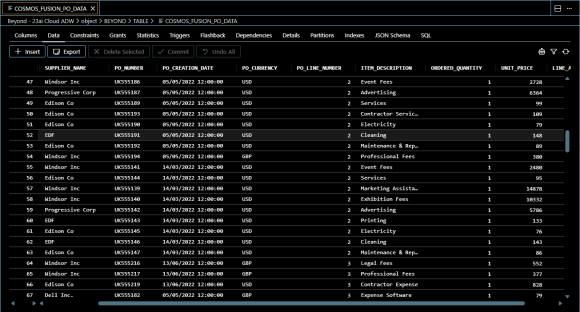
I can now ask the agent to use the “Beyond – 23ai Cloud ADW Connection” and ask it to “have a look” at the data in that table and i’ll give it some questions that I’m interested in knowing more about.

The agent uses MCP to orchestrate the connection and interrogation of the database using the LLM i’ve chosen. It plans out what it’s going to to do to achieve the goals and creates a number of wokflow steps to achieve that. At each it show me its intent and asks my permission to execute the commands – and I check every one before granting that permission to ensure that I am happy with the task that is being executed.
Note that the Oracle DB will also log all the commands executed in the DBTOOLS$MCP_LOG table as shown below.

So, let’s see what happpens when we step through a few of the commands. It connects to the database, validates the table exists and selects a few rows to sample the data.

Once the agent has executed some analysis of the data, it then continues with some further queries it created as workflow to manage the tasks I asked of it.

Finally I get a summary of the findings.

Then I get the details of the top suppliers that I requested – showing that my spend is with 6 suppliers so is highly concentrated.

Then I get some more in-depth analysis results across a lot of records which give me some really interesting insights on my data.

Once I have my queries dealt with, I am provided a bunch of suggestions of further analysis that might make sense to do.

I decide to take some advice and go for a monthly trend breakdown.

Thus turns out to be really useful, showing I have a big spend spike in April and also more details about other suppliers.

I can interpet these figures myself, but I also get some advice/assistance.

I’d quite like to start to see things visually, so I ask for some charting, which once i’ve installed Python means the agent can run the code and generate the chart I was asking about.

I get a chart showing the total amount by supplier – just so I can see the relative positions for them.

I can now get that done as a split by currency as I didn’t ask for that to be taken into consideration and also trending for other months, etc.
What I have discovered, is that I can quite quickly connect to a database and get an agent to get an LLM to interrogate that data for me to have a conversation to find insights in that data.
As we’re not just looking at data, but the AI has access to the metadata, I can ask it do all sorts of interesting things, such as have a look at what connections it can actually connect to

Then I can ask it tell me check tables starting with “MD” which do not have primary keys, which it then does, by allowing me to see the SQL it will run first to approve it, then once it does that suggests ways in which we address the ones that do not.

In my view, MCP is a game-changing technology, allowing us to run agents directly against our data. Of course with this power comes a lot of responsibility, especially in terms of security considerations, but experimenting with what is possible against my demo instance I can certainly appreciate the scope of possibilities for everything from DevOps automation and enhanced quality of metadata, to deep analysis of data in those databases, through to creating applications using that data.